Choose your cloud: Azure AWS

Live billed-cost analysis · Azure + AWS

See where your cloud spend leaks
— and reclaim it.

One launch turns your real Azure or AWS bill into an interactive savings report — then an AI agent reasons over your findings and tells you what to fix first, and the ROI.

Cost optimization is a team sport — see how the whole crew wins →

Enterprise-ready. Buy the toolkit once, or subscribe to the always-on AI agent — priced at a fraction of what it saves, and built for small, medium and enterprise-scale organisations.

Works with Microsoft Azure Amazon Web Services

  • ✓ Savings from your real billed cost — not list prices
  • ✓ Built from real Azure & AWS engagements
  • ✓ Editable formats (Excel, Notion, PDF, Word, HTML, JSON)

Trusted by cloud engineers, FinOps practitioners & consultancies

The FinOps operating model

FinOps isn't a gas station. It's a pit stop.

Before the tools, the mindset. Cutting cost solo is a car idling at the pump — FinOps is a pit crew where every persona has a role, and your spend leaves the box faster and leaner. Collaboration is the whole game.

Team principal
Leadership

Sets the ROI target and funds the program.

Race strategist
Product / business

Ties cost to value and unit economics.

Pit wall
Finance

Budgets, forecasts and commitments.

Crew chief
FinOps practitioner

Calls the cadence; translates between teams.

The mechanics
Engineering

Rightsize, kill waste, build cost-aware.

InformOptimizeOperate ·ROI you can defend

See how the crew works together →

See what you actually get

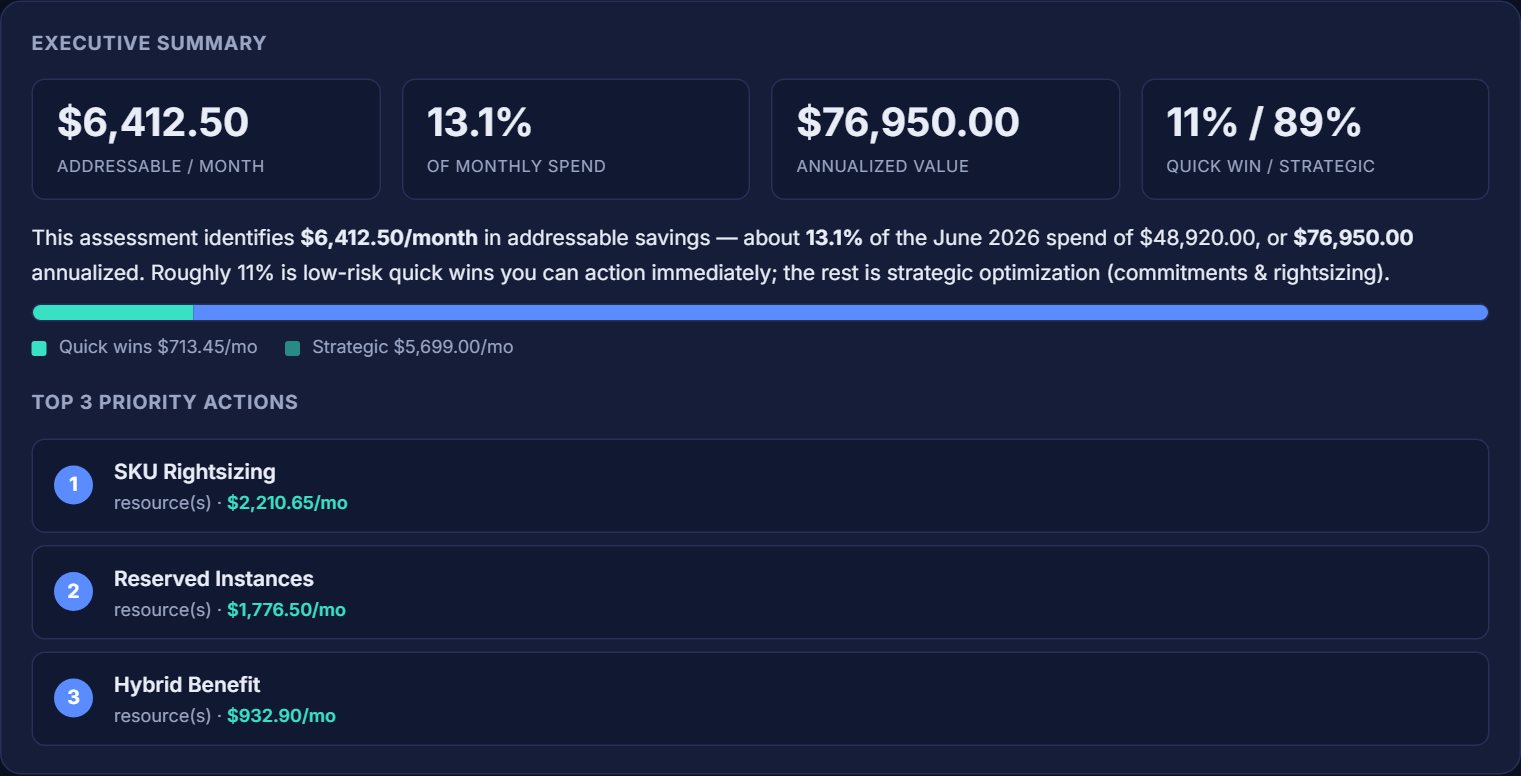
A peek at the interactive report from the CloudFinOpsKit Tool. Open the Return on investment tab to see the payback. Sample data shown; your numbers will differ.

CostOptReport_sample.html
Total monthly spend $48,920 Actual · Apr 2026
Potential monthly savings $11,740 24% of current spend
Potential annual savings $140,880 Projected at run rate
Findings 63 18 high · 27 medium · 18 low

Savings are sourced from your actual billed cost (Cost Management ActualCost), not list prices — so the headline number is one you can defend in a finance review.

The FinOps Toolkit

Start where you are

An always-on service that runs the whole loop — or one-time downloads you own forever.

RUNG 01
Measure
Real billed cost → priced findings
RUNG 02
Optimise
What to fix first, by ROI
RUNG 03
Govern
Stop the waste returning
RUNG 04
Prove ROI
Realised vs projected
The service · ongoing
◆ Flagship · subscription

FinOps Agent

Always-on and multi-cloud. One launch scans your Azure — and AWS — read-only in your own tenant, then an AI analyst reasons over your real findings and tells you what to fix first. It runs all four rungs.

Grounded — never invents a number
Credentials never leave your tenant
Azure + AWS in one dashboard
Usage included, no API key
$15per month · or $144/yr · Agency $79
Explore the Agent Compare plans

Cancel anytime · keep what you downloaded

The products · buy once, own forever
Pro Tool

CloudFinOpsKit Tool

The one-click CloudFinOpsKit Tool scans any Azure scope (75+ WAF (Well-Architected Framework)-aligned checks) and builds an interactive HTML report — savings sourced from your ACTUAL billed cost, not list prices. No scripting or technical skills needed: just double-click and follow the prompts. Also includes the FinOps Dashboard Pack savings tracker and a 90-prompt FinOps AI Prompt Library.

One-click ToolHTML reportJSONAI promptsExcel

Secure checkout · payments by Paddle.com

$49$40 Buy now
Best value

Azure Governance, Migration & Tagging Pack

Everything you need to govern, tag, and migrate Azure with confidence — a complete Notion governance workspace (policies, budget alerts, review cadence), a migration readiness kit (assessment checklist, scoring model, stakeholder reports), and a ready-to-deploy tagging & naming standard with a policy starter. Three toolkits, one price.

NotionExcelPDFMarkdown

Secure checkout · payments by Paddle.com

$40$20 Buy now
Free

Cloud Cost Review Checklist (Azure & AWS)

A one-page monthly cost-review checklist for Azure & AWS. Grab it free — it's the perfect intro to the full toolkit.

PDF

Inside the report

Not a spreadsheet — a FinOps command center

Every run opens with an eight-panel FinOps Insights band that turns raw findings into the views finance and engineering actually act on. One HTML file, no dashboard to host, no data leaving your tenant.

📋

Executive summary

Addressable savings, % of spend recoverable, annualized value and the top-3 priority actions — the slide your CFO wants.

📊

FinOps maturity score

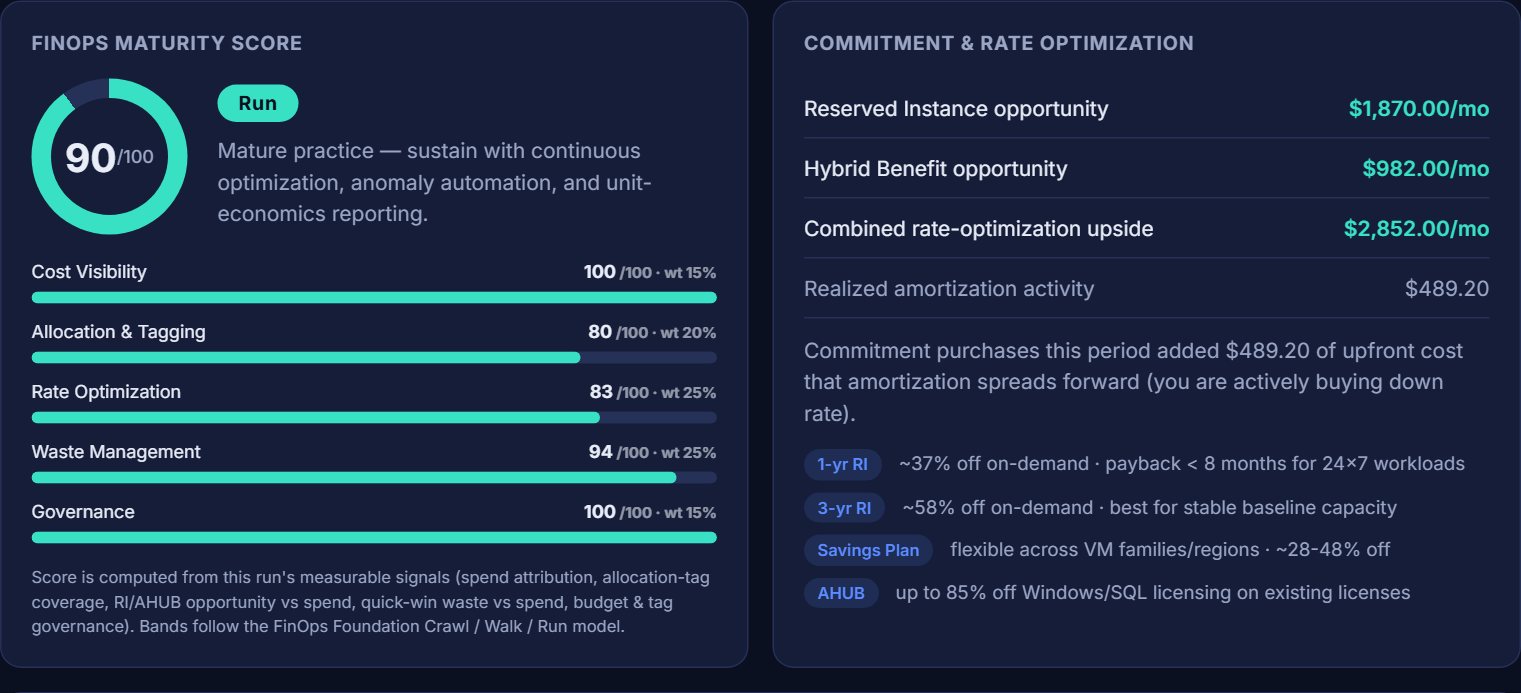
A computed 0–100 score across five weighted dimensions, banded Crawl / Walk / Run — a benchmark, not just a to-do list.

💳

Commitment & rate

Reserved Instance, Savings Plan and Hybrid Benefit upside with payback guidance — the highest-dollar FinOps lever.

🏷️

Allocation & showback

Which allocation dimensions exist, their coverage, and a readiness score — the foundation for chargeback.

🏆

Top cost contributors

Top subscriptions, services and resource groups by attributed spend — find the 20% driving 80% of the bill.

💧

Optimization waterfall

Current effective spend to optimized run-rate, with quick-win vs strategic split and your effective savings rate.

🗺️

Inventory & regions

Resource types by count and cost, plus regional distribution — spot sprawl, concentration and residency risk.

🛡️

Governance posture

Tag coverage, untagged and orphaned counts, budgets and anomaly signals — accountability and hygiene at a glance.

Plus an AI workloads module that tracks per-model token spend and prompt-cache waste, a Cost Anomaly Watch module that scans ~3 months of daily spend for spikes, creep and new spend sources (with Teams/Slack webhook alerts — and fully documented math, no black box), and live retail-price fallback so cost shows up even when you only have read-only access. See the live sample →

Findings → fixed

Every finding comes with the fix — and the order to act

The report doesn't just flag waste. Each finding carries a priced recommendation, the Well-Architected reference, and the exact next step — for Azure and AWS. Here's the remediation playbook it builds you, sequenced by fastest payback.

  1. 1

    Clear the waste

    Do today · near-zero risk

    Delete orphaned disks, unassociated public IPs and stale snapshots; stop or deallocate idle VMs. Pure savings — nothing in production depends on them.

  2. 2

    Right-size what's left

    This week · low risk

    Downsize over-provisioned VMs and databases, modernise old SKU generations, and move dev/test to auto-shutdown or serverless — guided by Azure Advisor and AWS Compute Optimizer.

  3. 3

    Commit the steady baseline

    Plan · finance sign-off

    Cover always-on workloads with Reserved Instances or Savings Plans — often 30–60% off pay-as-you-go — and apply Azure Hybrid Benefit to reuse existing Windows/SQL licences.

  4. 4

    Tame AI & data spend

    This week · low risk

    Delete zombie AI deployments, enable prompt caching, cap output tokens and route simple prompts to cheaper models; right-size Log Analytics tiers and backup redundancy (LRS vs GRS).

  5. 5

    Govern so it can't creep back

    Ongoing · prevents recurrence

    Set budgets with 80/100/120% alerts, enforce required tags with Azure Policy or AWS SCPs, and add cost guardrails — then re-run monthly to hold the line and watch the maturity score climb.

Every step maps to real findings in your report — priced, prioritised, with the commands to act. Get your remediation plan →

Why these beat starting from scratch

Hours, not weeks

Pre-built structures mean you skip the blank-page problem and start delivering value immediately.

🛡️

Real-world tested

Drawn from actual Azure cost-optimization engagements — not theory or generic AI output.

🔄

Editable & yours

Open formats you fully own. Customize, rebrand, and reuse across every client or team.

🚀

Ready in minutes

Download instantly and put it to work the same day — no setup project, no waiting.

Where CloudFinOpsKit fits

An honest look at your options. We're not trying to replace the free cloud tools — we package them into something you can act on in minutes.

Free native tools

Azure Cost Management, AWS Cost Explorer, Advisor

Microsoft FinOps toolkit, Compute Optimizer & friends.

Free

  • Authoritative data straight from the cloud — always current
  • No cost, built into your portal
  • Spread across many screens — you stitch the story together
  • No maturity score, allocation statement, or packaged report
  • One cloud at a time; a real learning curve
Enterprise platforms

CloudHealth, Cloudability, Apptio, Finout…

For large orgs with a dedicated FinOps team.

$$$$ · annual contracts

  • Continuous, real-time monitoring at scale
  • Deep integrations, dashboards & anomaly alerting
  • Onboarding project + procurement cycle
  • Significant ongoing cost
  • Overkill for small and mid-sized estates

Most teams sit between free-but-fiddly and enterprise-but-expensive. That's the gap CloudFinOpsKit fills — and if you outgrow it, you'll know exactly what to ask a platform for. Browse the toolkit →

AI and FinOps

Built with AI. Designed to be run with AI.

CloudFinOpsKit is built for the AI era of FinOps — in two directions at once. We use AI to make cost optimization faster, more accurate, and more scalable, and we help you govern the cost and business value of the AI you run. Both directions map directly to the FinOps framework — AI for FinOps and FinOps for AI — and it's exactly where the discipline is heading: AI cost management is the #1 skillset FinOps teams want to add in 2026.

AI for FinOps

AI that amplifies your team

We use AI to build, sharpen, and run the assessments — anomaly spotting, rightsizing logic, and plain-English cost querying — amplifying practitioner capability rather than replacing expertise.

FinOps for AI

Govern the cost & value of your AI

AI spend has gone mainstream — 98% of FinOps teams now manage it, up from 31% just two years ago. But cost is only half the story — it's about driving value in your AI and proving the value of your AI. We surface your AI/ML & GPU compute today, with token-level unit economics and AI-ROI on the roadmap.

What that looks like inside CloudFinOpsKit

Built & refined with AI

Every toolkit, check, and assessment is developed and continuously sharpened with AI — so you get expert-grade FinOps without the expert-sized bill.

Query your costs in plain English

Your assessment exports portable JSON, CSV and a FOCUS-aligned CSV (the open FinOps billing-data standard every major cloud now speaks) — plus a one-click "Copy for your AI assistant" hand-off and a 90-prompt FinOps AI Prompt Library for ChatGPT, Copilot, or Claude.

Ask Jeff — your AI FinOps advisor

A built-in AI assistant that helps you pick the right toolkit, run your assessment, and understand your savings in plain language. Live on this site right now.

Coming soon

Agentic AI that plugs into your cloud

Connect AI directly to your environment so it can assess, recommend, and optimize autonomously — plus AI-native cost tracking for tokens, GPUs, and inference. Agentic FinOps that keeps finding savings while you sleep.

Get a free checklist + launch discounts

Drop your email for a free cloud cost-review checklist (Azure & AWS) and early access to new drops.

Quick estimate

What could you save?

Drag to your monthly Azure spend. FinOps adopters typically recover 20–30%; we use a conservative 24% benchmark here. Your real number comes from your actual billed cost when you run the tool.

$50,000
$2k$500k+
$12,000Est. monthly savings
$144,000Annualized
5,760×Return on a $40 tool
< 1 dayPayback period
Find my savings — $40

Open the full calculator — Azure + AWS, broken down by category →

Illustrative estimate at a 24% benchmark recovery rate — not a quote. The tool reports figures from your own Cost Management data.

Azure Cloud FinOps Bundle

Both paid toolkits in one download — the complete kit to find Azure savings, then govern, tag, and migrate with confidence. Buy once, get everything.

  • CloudFinOpsKit Tool — 75+ WAF (Well-Architected Framework)-aligned checks, interactive HTML report
  • Governance workspace — policies, budget alerts & review cadence (Notion)
  • Migration Readiness Kit — assessment checklist, scoring & stakeholder reports
  • Tagging & Naming Standard — taxonomy, conventions & a policy starter
  • Instant download — ready to use in minutes

$50

Both toolkits · One-time payment · Instant access

Get the bundle

Secure on-site checkout · Yours to keep forever

Run AWS too? Get the Multi-Cloud FinOps Bundle — both clouds, every toolkit, doc & workbook in one download.

See the AWS toolkit → Get both clouds — $85

Own it, or stay current

Buy once and keep it forever, or subscribe to stay on the latest with every new release and a monthly content drop. Cancel a subscription anytime — you always keep what you've downloaded.

One-time

Own it

A one-off audit or a single project.

$40+ one-time

  • The current release, yours to keep forever
  • All docs, workbooks & the prompt library
  • Free patches for that release · 14-day guarantee
  • No future major releases or monthly drops
Browse one-time options →
Agency

Use it across clients

MSPs & consultancies running client cost reviews.

$79 /mo
billed monthly · cancel anytime
$790 /yr
billed annually · 2 months free
  • Everything in Pro
  • Commercial use across unlimited clients
  • Rebrandable / white-label reports
  • Multi-seat + onboarding & priority support
Start Agency — $79/mo Start Agency — $790/yr

Not sure? Start with a one-time download — you can move to Pro any time, and a subscription always keeps you on the latest. Cancel whenever; you keep what you've downloaded.

Questions

What format are the products in?

Depending on the product: Excel, Notion, PDF, Word, HTML, and JSON. Each product page lists its exact format.

Does this cover AWS as well as Azure?

Yes. There's a dedicated CloudFinOpsKit toolkit for each cloud — one built to Azure best practices and one built to AWS best practices — each with cost checks tailored to that platform. Pick the toolkit for your cloud, or get the Multi-Cloud Bundle to cover both Azure and AWS in a single download.

Will this work for my environment, and any size of organization?

Yes — the CloudFinOpsKit Tool flexes from a single subscription or account to an entire enterprise estate, so it's suitable for small, medium, large, and enterprise-scale organizations alike. It runs locally on your machine using your existing read-only Azure or AWS access — there's no additional infrastructure to deploy, no agents to install, and no recurring fees. Assessments are generated on demand, so reviewing your estate costs the same whether you have 5 resources or 50,000.

How is delivery handled?

Checkout and instant download are handled securely on-site via Paddle (our Merchant of Record). You get a download link immediately after purchase.

What if my download link expires? Can I download my files again later?

Yes — your access is permanent. Each individual download link is short-lived (about 15 minutes) for security, but the thank-you / download page itself isn't. Just reopen it from the link in your Paddle order-confirmation email (or click "Get fresh download links" on the page) and a new set of 15-minute links is minted on the spot. You can do this as many times as you need.

Can I use these for client work?

Yes. You can customize and reuse them across your own projects and clients. You may not resell the toolkits as-is.

Are there updates and new releases coming?

Yes — CloudFinOpsKit is actively developed. We support Azure and AWS today, with GCP on the roadmap, plus regular new releases bringing more advanced cloud and AI cost-optimization recommendations, more FinOps automation, and fresh AI prompts.

I get a "publisher could not be verified" warning when I run the tool — is that a problem?

No — that's Windows' standard prompt for any script downloaded from the internet, and it's safe (the scan is read-only and changes nothing). Just click Run — or "More info → Run anyway" on the blue banner — and it won't ask again. To avoid it entirely, right-click the downloaded ZIP → Properties → tick Unblock before you extract. A .cmd launcher can't carry a publisher signature, so Windows always labels it "Unknown Publisher" — it doesn't mean anything is wrong.

Do you offer refunds?

Yes — we offer a 14-day money-back guarantee. Request a refund within 14 days of purchase, no exceptions, via the support link in your Paddle order-confirmation email.